The end of Microsoft Basic Authentication
Microsoft is continuing to enhance security and will be removing one of the last remaining outdated login methods in Exchange Online in the coming months: Basic Authentication for SMTP AUTH Client Submission. Many companies still use this method for automated processes – often unknowingly and deeply integrated into business processes.
With the discontinuation of Basic Authentication for Client Submission (SMTP AUTH), Microsoft is consistently pursuing its multi-year plan to improve cloud security. The schedule has been set: Microsoft will begin rejecting the first Basic Auth connections on 1 March 2026, and Basic Authentication for SMTP AUTH will be completely disabled on 30 April 2026. What may sound like a minor technical change at first glance can have a direct impact on business processes – for example, if invoices, alerts or status messages can no longer be sent by email. Now is the right time for companies to review their own environments and plan the transition in a structured manner.
Why Microsoft is discontinuing BASIC AUTHENTICATION
Basic Authentication is now a fundamental security risk. Usernames and passwords are only transmitted in Base64-encoded form for each connection – an open gateway for phishing, brute force attacks and credential stuffing.
Even more critically, Basic Auth undermines modern security concepts because it does not support multi-factor authentication (MFA). As long as a tenant accepts Basic Auth, a backdoor remains open – even if strong security mechanisms have already been implemented elsewhere.
Microsoft is therefore following a clear line: away from password-based logins, towards zero trust and modern, token-based authentication using OAuth 2.0. OAuth 2.0 significantly reduces the risk of stolen passwords, can be controlled granularly and forms the basis for stable security controls. Basic Authentication has already been disabled for other protocols; with SMTP AUTH, one of the last remaining exceptions is now being removed.
WHAT EXACTLY IS OAUTH 2.0?
Imagine checking into a hotel. Instead of receiving the master key for the building (password/basic authentication), you are given a key card (token). This card only opens your room and perhaps the fitness area – and only for the duration of your stay. If the card is stolen, the vault remains secure.
This is exactly how OAuth 2.0 works: an application (e.g. a scanner) does not receive your password, but a time-limited access token. This token only allows clearly defined actions (e.g. ‘send email’) and can be revoked at any time without having to change the main password. This significantly increases security, keeps the login process compatible with modern methods such as MFA, and noticeably reduces the risk of compromised access data.
THE TIMETABLE UNTIL FINAL SHUTDOWN
To ensure that the changeover does not happen overnight, Microsoft has deliberately divided the process into several steps. Since October 2024, an updated report for SMTP AUTH client submission has been available in the Exchange Admin Centre. This report shows which devices and applications still use basic authentication. For administrators, this is the starting point for creating transparency and compiling a complete list of all affected systems.
On 1 March 2026, Microsoft will begin to specifically reject a small portion of Basic Auth connections. This is intentional and serves as a practical test: systems that sporadically stop sending emails from this point onwards will need to take action. This gives companies a clear signal before the change takes effect permanently.
On 30 April 2026, Basic Authentication for SMTP AUTH will be completely deactivated. Any connection attempt with Basic Auth will be rejected and acknowledged with the message ‘550 5.7.30 Basic authentication is not supported for Client Submission’. No further extension or exemption is planned.
THE CHALLENGE: WHEN HARDWARE IS NOT ‘SMART’ ENOUGH
In theory, switching to OAuth 2.0 is easy. In practice, however, it often fails due to the existing infrastructure in the background. While laptops and smartphones have long been modernised, printers, scanners, older ERP systems and scripts continue to stubbornly communicate using usernames and passwords.
Typical examples include a scanner that sends delivery notes to a central mailbox address, an ERP system that automatically sends order confirmations by email, or a monitoring tool that sends alerts to the on-call service in the event of malfunctions. For many of these devices, there are no longer any current firmware updates available. A complete hardware or system replacement would be technically possible, but often disproportionate in economic terms.
That is why a systematic analysis of existing connections is the most important first step. If you know early on where basic authentication is still in use, you can carry out the changeover in a planned, risk-aware manner and without time pressure.
CONCRETE RECOMMENDATIONS FOR ACTION
Companies should proceed in a structured manner:
- Conduct an inventory
The SMTP AUTH Client Submission Report in the Exchange Admin Centre helps to identify all systems that still use basic authentication – including rarely used locations and special solutions.
- Categorise systems
Which ones can be converted to OAuth 2.0 via update or configuration? Which ones are obsolete and need to be replaced in the medium term? And for which systems is replacement desirable but not realistic in the short term?
- Create a migration plan
On this basis, a migration plan can be created that prioritises business-critical systems and allows sufficient time for testing. For modern systems, only a configuration adjustment is often necessary; Microsoft provides extensive documentation for OAuth implementation. For older systems, it is worth checking for available firmware updates or consulting the manufacturer.
Migration paths: from OAuth to SMTP relay
The strategy should be two-pronged.
- Modernisation (priority 1)
Wherever possible, systems should be converted directly to OAuth 2.0 – whether through software updates, firmware updates or configuration adjustments. Many current applications and services already support modern authentication. After the switch, access is more secure, traceably logged and can be integrated into existing security policies.
- Bridge technology (priority 2)
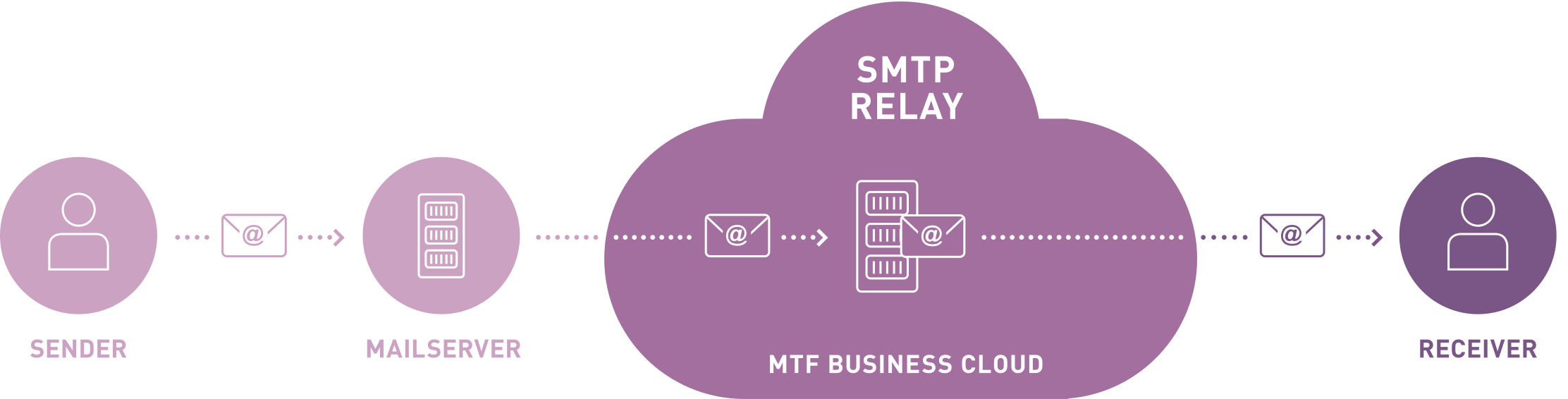
In practice, however, it is clear that not every system is ‘OAuth-enabled’. Systems that cannot be modernised require an intermediary. Older multifunction printers, industry solutions or individually developed applications often do not support OAuth 2.0 and no longer receive updates, but are still indispensable in operation. In these cases, an SMTP relay service is a good option, acting as a bridge between legacy systems and the modern email infrastructure. The older systems connect to the relay, which handles secure communication with Exchange Online and meets the requirements of Microsoft 365.
Risks of not switching over
It is tempting to put off dealing with this issue. However, those who delay the transition risk automated email delivery failures from May 2026 onwards: invoices will remain stuck in the ERP, scan-to-mail functions will fail, and alerts from monitoring systems will no longer reach anyone. Individual disruptions can quickly become a business risk – with consequences for efficiency, customer satisfaction and, in some circumstances, compliance. This means that the changeover is not just a technical detail, but a business-critical project.
SMTP MAIL RELAY FROM THE MTF BUSINESS CLOUD
As a bridging technology, MTF offers an SMTP mail relay service from the MTF Business Cloud. The service is specially designed for scenarios in which systems that do not support modern authentication must continue to operate but still need to send emails reliably.
The relay service runs in our highly available Swiss cloud environment, is optimised for sending from applications and devices, and can be integrated into existing security and compliance requirements in a controlled manner. Companies retain control over senders, routing and policies, while the technical complexity of connecting to Exchange Online is reduced.
The advantages of this solution are obvious:
- Continued operation of existing devices without hardware replacement.
- Swiss data storage in our highly available MTF Business Cloud.
- Decoupling from legacy systems without compromising cloud security.
MTF: YOUR PARTNER FOR MODERN AUTHENTICATION SOLUTIONS
The decision to disable Basic Authentication for SMTP AUTH has been made. Companies have until April 2026 to adapt their environment – but this time should be used actively. The next steps include a structured inventory, evaluation of affected systems and a decision on modernisation or a relay solution.
MTF supports you in making this transition predictable and secure. We analyse your Exchange Online environment, identify all relevant connections and work with you to develop a migration plan – from direct conversion to OAuth 2.0 to integration of the SMTP Mail Relay Service from the MTF Business Cloud.
If you want to ensure that your email communication continues to function smoothly after April 2026, it is worth discussing this with us at an early stage. Contact us for a no-obligation consultation – we will guide you step by step through the transition.
FAQs
- Does the discontinuation of Basic Authentication only affect SMTP or other protocols in Exchange Online as well?
The change that has now been announced specifically refers to Basic Authentication for SMTP AUTH client submission. Many other protocols such as POP, IMAP and Exchange ActiveSync have already been converted to modern authentication in previous waves. However, for companies that use SMTP for automated emails, this latest change is often the most noticeable – especially for printers, scanners, ERP systems and scripts.
- How can I find out which systems in my environment still use basic authentication for SMTP?
The most important starting point is the SMTP AUTH Client Submission Report in the Exchange Admin Centre. It shows which devices and applications still log in with Basic Authentication. It is also worth taking inventory of the infrastructure: Where are automated emails sent (scan-to-mail, ERP, monitoring, industry solutions)? This often reveals systems that have been running unchanged for years and are no longer a priority.
- Do all systems have to be converted to OAuth 2.0?
From a security perspective, OAuth 2.0 is the target state. Wherever updates, new versions or configuration adjustments are available, the direct switch should be made. In practice, however, there are devices and applications that do not support OAuth 2.0 and no longer receive updates. These systems can continue to be operated via bridge technologies such as an SMTP relay service without compromising the security requirements of Exchange Online.
- What exactly will happen if I do not take any action by April 2026?
From 1 March 2026, the first Basic Auth connections will be rejected on a trial basis, and from 30 April 2026, all Basic Auth logins for SMTP will be permanently blocked. Systems that continue to use Basic Authentication will then no longer be able to send emails. This typically affects invoice dispatch, status messages, alerts or scan-to-mail functions. Individual technical disruptions can thus quickly develop into a business risk.
- Is an SMTP relay service such as the MTF SMTP Mail Relay only a temporary solution or does it also make sense in the long term?
That depends on the company's strategy. For some customers, the relay service is a temporary solution to gain time for gradual modernisation. Others deliberately use the service in the long term to cleanly decouple legacy systems from Microsoft 365, enforce central security policies and handle email delivery from applications via a controlled, highly available service in Switzerland.
- Where should I start planning – and how can MTF support me in this?
The first step is always transparency: Which systems send emails and how? Based on this, the next step is to categorise (modernisable, replaceable, dependent on relay) and prioritise business-critical applications. MTF supports you in this process by analysing your Exchange Online environment, assessing the risks and creating a migration plan – including the implementation of OAuth 2.0 where possible and the integration of the MTF SMTP Mail Relay Service where bridge technology is required.
Also interesting
Do you have Questions ?
Tobias Menzi
Geschäftsleiter Region Liechtenstein, St. Gallen & Chur